Your files are in Etsy Purchases straight after checkout.
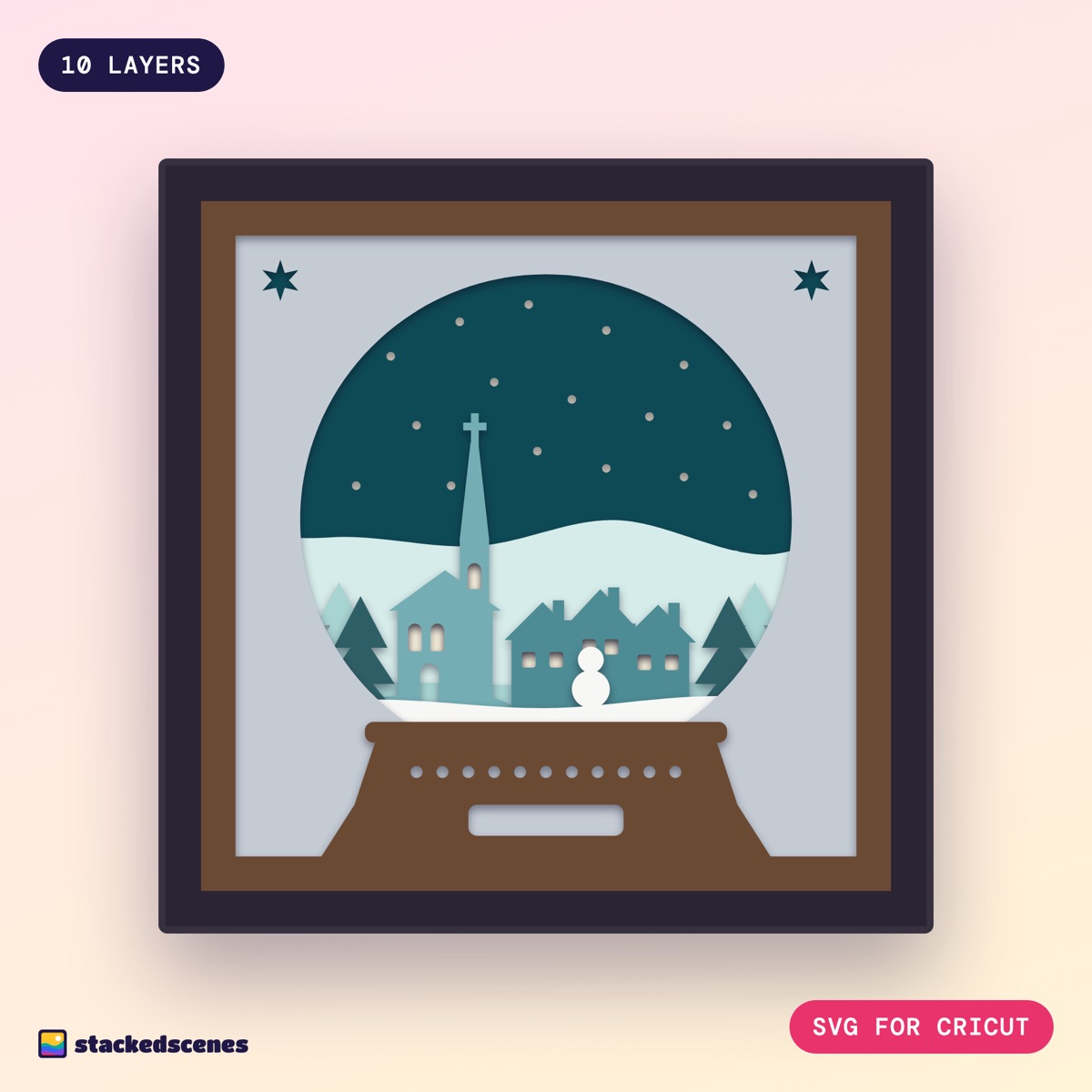
10-layer snow globe shadow box SVG, 8 x 8 in, ready to cut on your Cricut. Instant download with SVG, DXF, PNG, printable templates and a full build guide. A whole winter village inside a snow globe: a church with a tall spire, a row of cottages with glowing windows, spruces, a snowman and snow falling from a deep teal sky. The globe sits on a wooden base with a decorative band and a little plaque. Add fairy lights behind layer 2 and the falling snow and every window glows. WHAT'S IN THE DOWNLOAD - SVG: all 10 layers in one file in their suggested colours, plus each layer on its own - DXF: for Silhouette Studio Basic Edition - PNG: 300 dpi, transparent background - Printable templates PDF for cutting by hand - Build guide PDF with the colour guide, cutting steps and foam spacing Every layer is checked for clean cutting: one path per layer, nothing thinner than 2.3 mm and no floating pieces, so there's no welding or fiddling in Design Space. WHAT YOU NEED - Cricut Maker, Explore or Joy Xtra, or a Silhouette (the design is too wide for the original Cricut Joy) - 10 sheets of 65 to 80 lb (176 to 216 gsm) cardstock - 2 to 3 mm foam pads - A 9 x 9 in deep box frame - Optional: battery fairy lights This is a digital download. No physical item will be sent. Commercial use included: you can sell the finished shadow boxes you make, with no limit. Please don't share or resell the digital files. Full licence: stackedscenes.co.uk/licence Want to try one first? Get a free 5-layer design at stackedscenes.co.uk/free
- Combined SVG with all 10 layers in their suggested colours
- One SVG per layer, plus DXF for Silhouette Studio Basic
- 300 dpi transparent PNGs and printable templates
- Build guide PDF with the colour guide and foam spacing
- Commercial use included: sell the finished pieces you make
What's in the download
- Combined SVG with every layer in its suggested colour, for Cricut Design Space
- One SVG per layer, if you prefer to upload them one at a time
- DXF files for Silhouette Studio Basic
- PNG files and printable templates for hand cutting
- PDF build guide with the colour list and foam spacing
What you'll need
- A cutting machine: Cricut Maker, Explore or Joy Xtra, or a Silhouette Cameo or Portrait
- 10 sheets of 65 to 80 lb (176 to 216 gsm) cardstock
- 3D foam pads, 2 to 3 mm, doubled at the main depth breaks
- A 9 × 9 in shadow box frame (the design is 8 × 8 in with a mat border)
- Optional: a string of battery fairy lights
See how it stacks
10 layers, back to front, with the cardstock colour I used for each.
- 01BackingIvory shimmer · #F7F0DC
- 02Winter skyDeep teal · #0E4A55
- 03Far hillsIce mint · #D6ECEA
- 04Distant pinesSea glass · #A7D3D1
- 05ChurchFrosted teal · #74AEB4
- 06CottagesWinter teal · #4D8C95
- 07SprucesSpruce green · #2F5F66
- 08Snow and snowmanSnow white · #F7F7F4
- 09GlobeSilver metallic · #C4CBD3
- 10Wooden baseWalnut brown · #6B4A34
About Snow Globe Village
What is Snow Globe Village?
A snowy village inside a snow globe: a church with a tall spire, cottages with glowing windows, spruces and a snowman, on a wooden base with a plaque. It's a 10-layer papercut shadow box SVG, 8 × 8 in, ready to cut from cardstock on a Cricut or Silhouette.
Which cutting machines does it work with?
Cricut Maker, Explore and Joy Xtra (upload the SVG to Design Space), and Silhouette Cameo or Portrait (SVG in Designer Edition, DXF in Basic Edition). The original Cricut Joy is too narrow for an 8 in design.
What size frame do I need?
The design is 8 × 8 in and fits a 9 × 9 in deep shadow box frame.
How much cardstock does it take?
10 sheets of 65 to 80 lb (176 to 216 gsm) cardstock, one per layer: Ivory shimmer, Deep teal, Ice mint, Sea glass, Frosted teal, Winter teal, Spruce green, Snow white, Silver metallic, Walnut brown.
Can I sell the shadow boxes I make?
Yes. You can sell the finished physical pieces you make, with no limit. You can’t share or resell the digital files.